Custom embedded system
Runner's E-Paper Dashboard
A four-color, always-ready training command center built for one useful glance—not another screen demanding attention.
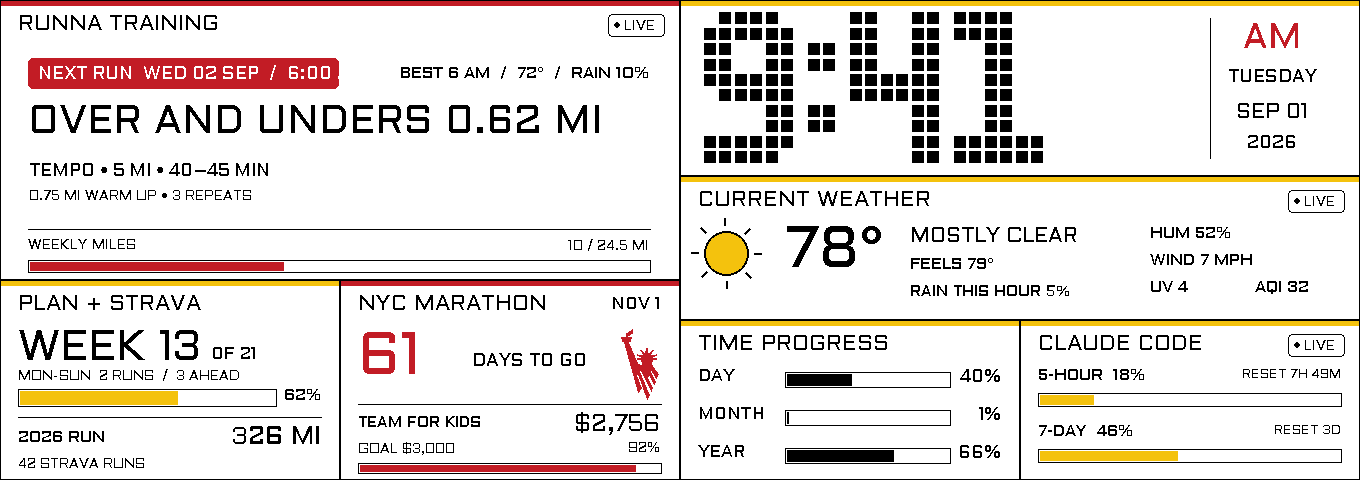
1360 × 480 canvas
Four-color interface
Two display controllers
172 hardware-free checks
One screen, six purposeful layers
The hierarchy follows the decisions a training day actually asks you to make—from the next workout to the conditions outside, then the quieter signals that keep the day on track.
- 1
Next workout
Runna surfaces the prescription, duration, best or scheduled weather window, and actual-versus-planned weekly mileage.
- 2
Training load
Monday–Sunday Strava progress shows completed runs, sessions still ahead, and current-year running mileage—all in miles.
- 3
Race-day motivation
The TCS New York City Marathon countdown sits beside live Team for Kids fundraising progress.
- 4
Conditions now
A large 12-hour clock and current weather cover temperature, rain, wind, humidity, UV, and air quality.
- 5
Time and tools
Day, month, and year progress share the lower rail with Claude Code's five-hour and seven-day usage windows.
- 6
E-paper lifecycle
Seam-safe partial updates, periodic de-ghosting, offline fallbacks, and configurable powered-down quiet periods keep the display useful without continuous activity.
01 / Scope
What I owned
Runner-focused interface design, Raspberry Pi integration, custom display-driver engineering, data integrations, and reliability testing.
Problem
Put the training plan, current conditions, race motivation, and daily context in view without opening a phone or accepting the visual noise of a conventional monitor.
Built
Designed a native 1360 × 480 interface around Runna, Strava, the New York City Marathon, weather, time progress, and Claude Code usage, then built a safe partial-refresh driver for the panel's two-controller architecture.
Outcome
A calm, runner-first surface that stays useful throughout the day, updates only the regions that changed, and powers the display hardware down overnight while the last image remains visible.
Engineering constraints
The conditions that
shaped the system.
The 10.85-inch glass is one visual canvas driven by two controller dies split exactly at x=680.
Four-color particles need a deliberate waveform; localized updates reduce disruption but do not turn e-paper into an LCD.
Personal API credentials must stay off the display, out of the repository, and recover cleanly when a service is unavailable.
02 / Key decisions
Tradeoffs made explicit
Runner first
Runna owns the largest region, with the next prescription and Monday–Sunday mileage visible before secondary system information.
Design to the silicon
Every widget is clipped to a controller-safe zone, so frequent updates never straddle the physical x=680 seam.
Conserve the panel
Localized updates handle the day, a full refresh clears accumulated ghosting every three hours, and one static night summary precedes hardware power-off.
03 / Under the surface
Architecture
- Raspberry Pi Zero 2 W service with isolated collectors for training, weather, fundraising, and developer-tool data
- Zone-local Pillow renderer constrained to the panel's black, white, yellow, and red palette
- Seam-aware JD79665AA driver coordinating independent master and slave controller windows
- Persistent refresh ledger, health endpoint, startup checks, and USB recovery path
Validation
- 172 hardware-free checks passed on September 4, 2026
- 127 driver checks plus 45 runtime checks; physical hardware was not exercised in this run
- Palette, clipping, controller-seam, and refresh-policy assertions
- Three-hour de-ghosting refresh plus deterministic quiet-hours behavior
- Python
- Raspberry Pi
- Pillow
- SPI
- E-Paper
- systemd
- REST APIs
INTERACTIVE ENGINEERING NOTE
One display. Two address spaces.
1360 × 480 canvas Controller seam at x=680
One changed region. One controller.
A widget inside the left half can be sent to the master controller without treating the full canvas as dirty. Drawing and clipping must stay inside that controller’s address space.
Region inside x=0–679 → master controllerThe highlight illustrates addressing only. It does not simulate the panel’s physical color waveform or refresh speed.
04 / Result
A runner-focused interface connected to service integrations, custom display control, and a tested software refresh policy. The software verification record and its limits are documented below.
Tour the interfaceEVIDENCE & BOUNDARIES
What this work demonstrates.
172 hardware-free checks passed: 127 across driver, framebuffer, refresh, and power-policy suites; 45 across runtime and scheduling. The checks were run on September 4, 2026.
Refresh the whole display, or only the part that changed?
- Decision
- Map frequently updated widgets into controller-safe regions and update those regions independently.
- Tradeoff
- The layout and driver must respect two address spaces. Periodic full refreshes are still necessary; localized addressing does not make the pigment waveform instantaneous.
Scope & limitations
These checks use simulated hardware. They do not establish physical refresh speed, image quality, power consumption, or long-term field reliability. The product view is a 3D visualization, not a photograph or a live display.